How to recharge cell phone online? Recharge China Mobile Online - Buy from TaoBao

In China recharge or top up your mobile phone is not a difficult task. But sometime it is annoying when your cell phone balance ends up in the middle of the night and you don’t even notice it. As a result you cannot make any outgoing calls and no incoming calls either. Therefore it would be really convenient if you know how to recharge cell phone online.
There are plenty of websites where you can recharge or top up your mobile phone 24/7. This article will show you how you can recharge or top up your cell phone from Taobao.
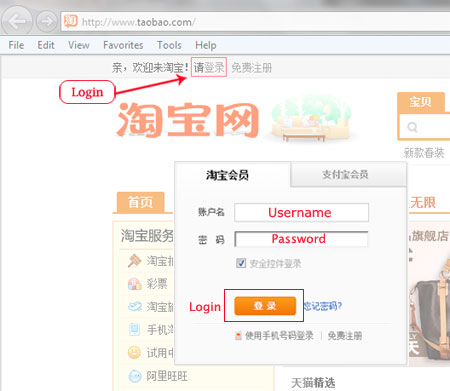
Step 1: Go to taobao.com and log in to your Taobao account. If you don’t have an account please check "how to create an account on taobao".
Step 2: After you login, on the left side of the Taobao homepage select “Phone Recharge” option and insert your cell phone number. Confirm your cell phone number again. Next select the amount and click on “Recharge”
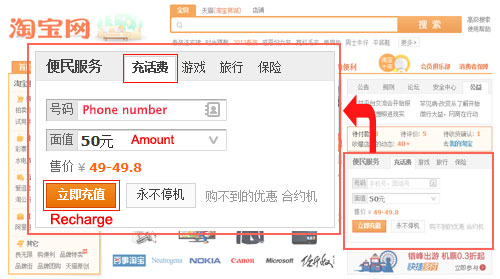
Step 3: After clicking on the recharge option you will be redirected to another page where you have to go through few more steps to make the payment. To make a successful payment please go to “How to buy VOIP credit from taobao?” and follow step 7 – step 12.
Once you are done with the payment you will receive a text message within a few minutes to ensure that your cell phone is successfully recharged.
*** If you have further questions please feel free to post on our forum. We will answer your question as soon as possible.

Member Login
China Bangla News


Popular Items

World’s longest high speed rail line opens in ...
In China recharge or top up your mobile phone is...